KCIC Data Automation
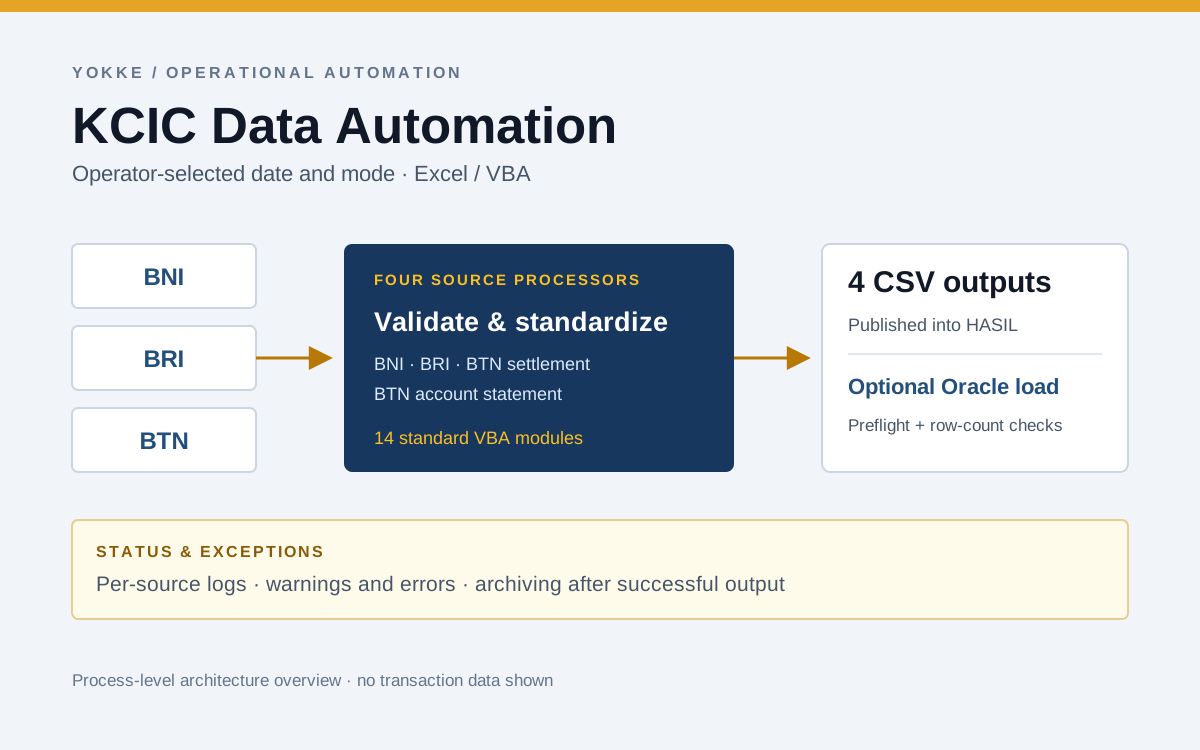
An Excel/VBA workflow built during my Yokke internship to prepare reports from three banks, generate four standardized CSV outputs, and support Oracle ingestion with validation, logging, and archiving.
- 3
- bank sources
- 4
- CSV outputs
- 14
- VBA modules
My role
Developer during my Business Data Operations — Data Governance internship at PT Mitra Transaksi Indonesia (Yokke). Translated operator requirements into the Excel/VBA workflow, implemented preprocessing and Oracle integration, refactored the code, and incorporated operational feedback.
Problem
Operators preparing KCIC transaction data worked with different report formats from BNI, BRI, and BTN. Source-specific transformations, date handling, CSV preparation, and manual database import had to be repeated for each processing date.
The task was to automate preprocessing through ingestion while preserving operator control over the data date, processing mode, and review of results. Source collection and downstream reconciliation remained separate operational steps.
Approach
I developed an Excel/VBA tool around the operator's existing workflow. A CONTROL worksheet provides a folder picker, a manually selected data date, and CSV-only or CSV-plus-database modes. Four processors handle BNI, BRI, BTN settlement, and BTN account-statement reports.
Each processor discovers its inputs, applies source-specific transformations, standardizes values, validates the output, and publishes a CSV. Successfully processed source files are archived in a dated batch folder, with generated CSVs collected in a HASIL subfolder. Per-source logging records information, warnings, successes, and errors so the operator can identify which part needs attention.
The database mode adds Oracle connection checks, metadata preflight, loading, and row-count verification. I refactored the implementation into 14 standard VBA modules and iterated on date handling, output organization, and database support through operator and mentor feedback.
Results
- Delivered a workflow supporting three bank sources and four standardized CSV outputs, with optional Oracle ingestion.
- The operator was using the tool routinely for three weeks by the 6 October progress update, following four updates based on operational feedback.
- In one matched observation of preprocessing through Oracle ingestion, the manual method took 26m 55.15s and VBA took 1m 08.20s — a difference of 25m 46.95s. This is a single observation per method, not an average benchmark.
- Made partial-run outcomes visible: the supplied CSV-only log records successful processors alongside a BRI file-open error, while subsequent processors continue and database import is explicitly skipped.
Architecture
A single Excel workbook provides the operator interface and batch orchestrator. Source-specific processors share helpers for configuration, file discovery, validation, standardization, CSV writing, archiving, and logging. A separate Oracle module handles the optional database-loading path.
CSV output is written to a temporary file and checked before publication. Successfully processed inputs are then archived. Source-level errors are logged without automatically preventing the remaining processors from running. Oracle loading is selected explicitly by the operator and requires the matching Oracle client/provider on the workstation.
Technical decisions
- Excel as the operator interface: keep the workflow accessible through a familiar application, with visible parameters and a single processing action.
- Source-specific processors: isolate bank-format changes from shared CSV, validation, logging, and database code.
- Explicit date selection: let the operator process a chosen date, including batches collected after a weekend.
- Two processing modes: support CSV preparation independently from Oracle loading.
- Visible partial failures: record each processor's outcome so a completed batch action does not conceal an individual source error.
Lessons
- Operational feedback changes requirements: database support, manual dates, and a clearer output folder structure emerged through use and review.
- A log should explain what happened: warnings, individual failures, successful processors, and skipped stages each need a distinct status.
- Compare equivalent work: preprocessing-to-ingestion timings should be compared with the same scope, rather than the longer downstream reconciliation workflow.
Stack
Timing observation
The recorded comparison on 16 September 2026 used the same input, workstation, and scope: preprocessing through Oracle ingestion.
| Method | Observed duration |
|---|---|
| Manual | 26m 55.15s |
| Excel/VBA | 1m 08.20s |
| Difference | 25m 46.95s |
Each method was observed once. These timings describe that comparison and exclude source collection and the subsequent query/Pentaho workflow.
Operator controls
The CONTROL worksheet lets the operator choose an input folder, set the data date, select a processing mode, and run the batch. The supplied screenshot shows CSV SAJA (CSV only).
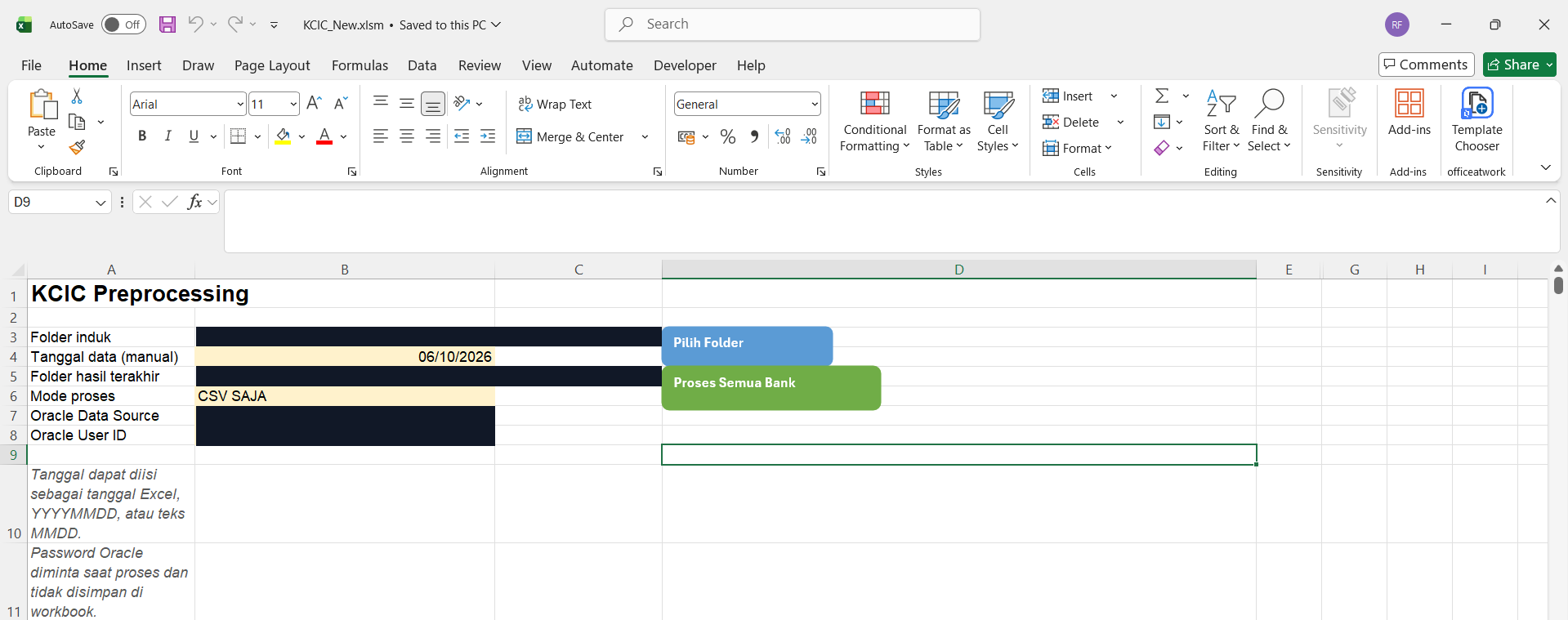
Folder paths and connection values are covered with solid privacy masks. The screenshot’s remaining pixels are unchanged.
Execution log
This supplied run demonstrates partial success and error reporting. BNI records an empty-file warning before completing; BRI encounters a file-open error; both BTN processors report success. The final entry states that database import was skipped because the selected mode was CSV only.
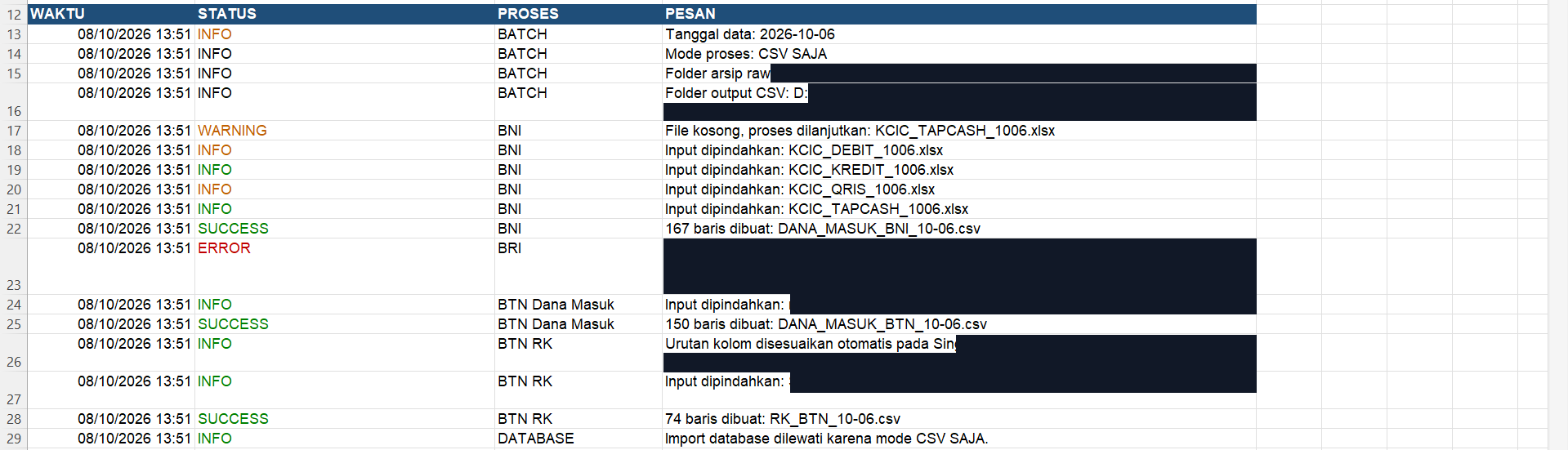
Paths and identifier-bearing message areas are redacted. Original timestamps, statuses, processor names, and the database-skip entry are preserved.