Big Data Toolkit
Scaling and deploying MBC Lab's no-code ML-lifecycle teaching toolkit — a Streamlit app that collapsed past one user on a free tier — onto a GCP VM that served the whole study group.
- 70
- learners served
- ~30
- peak concurrent users
- 16×
- RAM over free tier
My role
Refinement & deployment owner. The toolkit itself is an existing, IP-registered lab project from a former division head; in my cohort it was maintained by two people. I handled code optimization, caching, containerization, performance debugging, GCP deployment, and monitoring — a teammate handled new features and UI.
Problem
Big Data Toolkit is a no-code teaching tool that walks beginners through the full machine-learning lifecycle — from data preparation to modeling to generating a submission CSV — so study-group participants can focus on understanding concepts instead of fighting code. It is an existing, IP-registered lab project; my cohort inherited it for maintenance.
The blocker was hosting. On Streamlit's free tier (~1GB RAM) the app could effectively serve only one user at a time — past that, it went down. For a study group of dozens, that made it unusable exactly when it was needed.
Approach
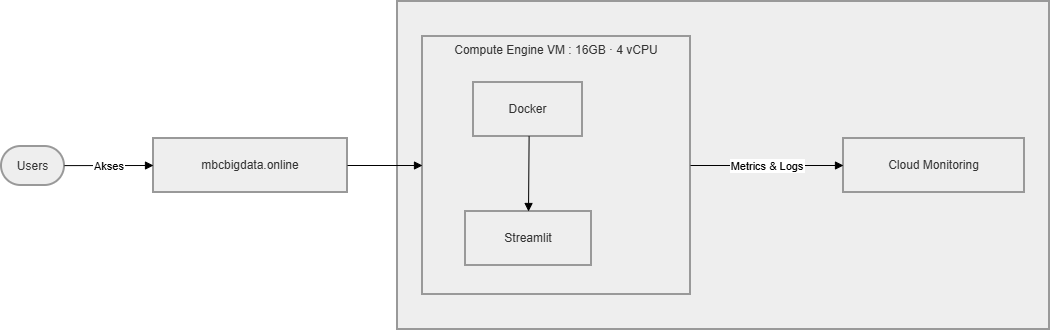
My contribution was everything from refinement through deployment. I containerized the Streamlit app with Docker and deployed it as a monolith on a single GCP Compute Engine VM (16GB RAM, ~4 vCPU), behind a custom domain the division purchased. Along the way I optimized code paths, added caching to cut redundant recomputation, fixed a string of performance bugs surfaced by real users, and set up monitoring to watch resource use under load.
RAM was provisioned generously — well above measured usage — to absorb the concurrency spike near assignment deadlines, planning for roughly 30 active users at peak. A teammate handled feature additions and UI improvements; I owned the deployment side.
Results
- Took the app from "dies past one user" on the free tier to serving the full ~70-person study group, with up to ~30 concurrent users at peak, without crashing.
- Resolved a wave of post-launch bugs and lag complaints that only appeared under real, concurrent use.
- Stood up monitoring to confirm the VM had resource headroom under load.
- Retired the deployment cleanly after the program week — VM and domain taken down to control cloud cost, since the active window was short.
Architecture
A deliberately simple, monolithic deployment: the Streamlit app containerized with Docker and run on one GCP Compute Engine VM (16GB RAM, ~4 vCPU), reachable through a purchased custom domain. Streamlit caching reduced recomputation, and Cloud Monitoring tracked CPU and memory under load. There was no autoscaling or CI/CD — a scope-appropriate choice for a one-week program — and the whole stack was torn down once the program ended.
Technical decisions
- Single-VM monolith over serverless or a cluster: the simplest path to a stable, full-control environment for a short-lived program, with no CI/CD overhead I didn't yet need.
- Generous RAM headroom (16GB): provisioned far above observed usage to absorb peak concurrency around deadlines, rather than risk the free-tier failure mode.
- Caching + containerization: cut repeated recomputation and made the runtime reproducible across redeploys.
- Tear down on schedule: with a roughly one-week usage window, keeping the VM and domain alive afterward wasn't worth the cloud credit — so it was deliberately retired.
Lessons
- Deployment is not the finish line: going live opened a second wave of work — bug reports, lag complaints, and Streamlit resetting all progress on every refresh. Production is where the real feedback starts, not where it ends. (A full write-up of this is worth its own blog post.)
- Some bottlenecks are architectural, not resource-based: even with 16GB RAM and healthy monitoring metrics, the app still felt slow. My read is that Streamlit's re-run-on-every-interaction model doesn't scale gracefully outside its own hosting — so the real fix would be application-level, not just bigger hardware. (A hypothesis, not a settled conclusion.)
- Right-size for lifespan: for a one-week tool, a simple VM that gets torn down afterward beat over-investing in autoscaling or pipelines.